Do you want to take advantage of the benefits of AI-generated content? Not all tools are created equal. Find out how to choose the best AI content generation tools for your needs and how best to use them.
But what exactly is AI content and what advantages does it offer? Understand the technology behind AI-generated content and how you can make it work for you.
Are AI copywriting tools worth using?
If you work in any aspect of digital marketing or online publishing, you can’t have missed the hype surrounding ChatGPT, Jasper, and other AI copywriting tools.
These AI writing assistants promise to save time, money, and effort by generating content ideas and even complete pieces of copy. But are they really worth using? Or do the risks outweigh the advantages?
AI vs. AI and writer vs. professional writers:
the ultimate comparison
Explore the key features of all approaches to writing content
and find out what works better for your business.
Your email is safe with us
The quick answer is that it depends on how you use these tools and what you’re trying to achieve. If you’re hoping that AI will take over the entire process of content generation so you can fire your writing team, you’re going to be disappointed. AI is not a replacement for human copywriters.
However, artificial intelligence does work well as an assistant to a human writer. It can be a fantastic tool for helping the creative process and suggesting direction for content ideas and structure.
You can also use AI to speed up content production by creating content outlines, generating headline ideas, and writing meta descriptions and short pieces of copy.
In this article, we’ll look at some of the most popular AI copywriting and content creation tools available today.
The best AI copywriting tools
There are new AI copywriting tools appearing every day. Some of them can be very useful, while you may want to avoid others. Here are a few of the top-rated AI content writing tools you might want to consider:
Jasper
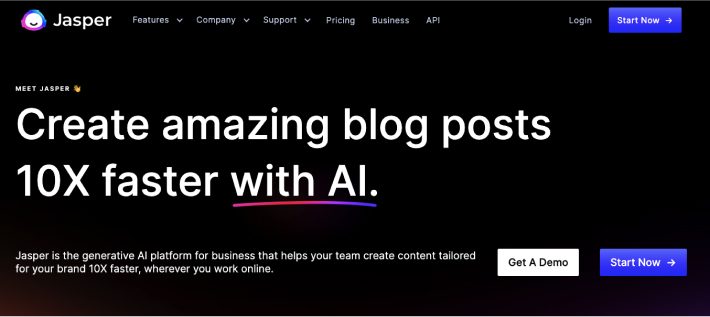
Jasper (formerly known as Jarvis) made headlines when it became one of the first AI tools to hit “unicorn” status, meaning it was valued at over $1 billion.
While Jasper now includes a chatbot similar to ChatGPT, its main interface is a freeform text editor that takes commands written in plain English and writes paragraphs of copy based on the instructions it’s given.
Jasper also comes with several content templates to assist in producing different types of copy, such as product descriptions, social media posts, and blog articles.
Jasper features
- Templates based on popular copywriting frameworks such as AIDA
- A one-shot blog post template that will generate an entire blog post with an introduction, body, and conclusion
- Option to specify the tone of voice, such as “friendly” or “informative,” or even a specific person such as “Joe Rogan”
- “Boss mode” feature that allows for long-form content creation in an editor similar to Google Docs
- Chrome extension that enables you to use Jasper anywhere you write on the web
- Built-in integration with Surfer SEO
- Supports over 29 languages (although the official word is it’s trained more “thoroughly” in English)
Pricing
Jasper pricing is based on the number of words you generate each month, with plans starting from $49 a month for 50,000 words.
Pros and cons of Jasper for AI copywriting
Pros
|
Cons
|
Writesonic
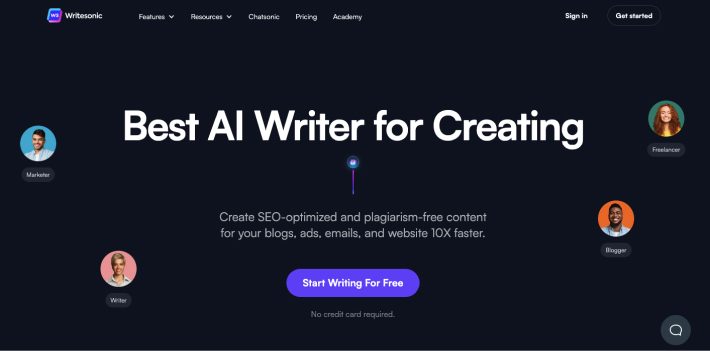
Writesonic is an easy-to-use AI copywriting tool designed to make content creation faster and more efficient. Aimed at marketers, small business owners, and website publishers, it gives users the ability to generate entire pieces of content at the click of a button.
The template-based interface allows users to quickly produce content such as landing pages, CTAs, Amazon product descriptions, and blog posts. It also includes specific templates to generate content for social media platforms including Twitter, LinkedIn, Instagram, and TikTok.
Writesonic features
- Large library of templates designed to help you create content for specific business and marketing purposes such as a social media content plan or company mission
- Paraphrasing tool for rewriting content
- Quickly generate ideas for blog content and articles
- Surfer SEO integration
- Trained on copy from some of the world’s top brands (unfortunately, the company doesn’t specify which brands!)
Pricing
Somewhat uniquely, Writesonic allows you to adjust the quality of the content produced from “economy” to “premium” and pricing changes accordingly. Content generated at economy level is generally simpler and similar to what you might expect from a non-native writer, while premium content is more creative and uses a wider vocabulary. Plans start from $12.67 a month for 19,000 words at the premium level and 190,000 words at the economy level.
Pros and cons of Writesonic for AI copywriting
Pros
|
Cons
|
Copy.ai
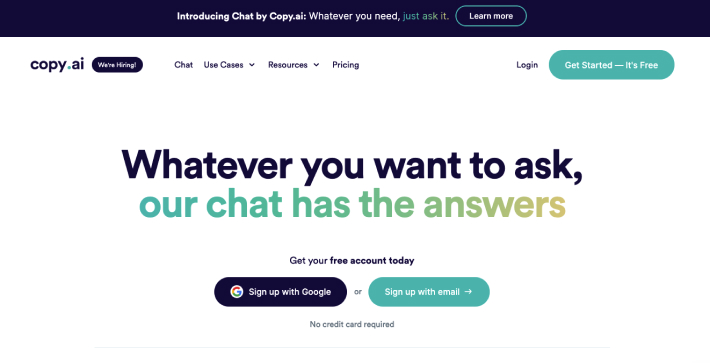
Copy.ai markets itself as a tool to overcome writer’s block, with promises to help writers write blog posts 10x faster and assist business owners in crafting more compelling copy.
The tool is designed mainly for writing blog posts, emails, and social media posts, and it’s very easy to get started with a step-by-step wizard that asks for details about your brand and products before spitting out a selection of auto-generated content.
Copy.ai is very clear that the copy you generate with the tool is not intended to be published as is, and you should rather use it as a starting point to edit, refine, and expand upon.
Copy.ai features
- Specific templates for different types of content, such as listicles, how-to blogs, and email nurture sequences
- AI workflow automation to speed up content production
- Creates copy designed to be optimized for high conversions
- Social media caption and description generator for all the major platforms
Pricing
Copy.ai offers a free plan that allows you to generate up to 2,000 words a month. Paid plans start at $36 a month. The major benefit of Copy.ai over its competitors is that the pro plans offer unlimited words, so you can generate as much content as you wish without having to pay extra for it.
Pros and cons of Copy.ai for AI copywriting
Pros
|
Cons
|
The best AI tools to rewrite content
There are many reasons why you might want to rewrite content, from simply wanting to redraft a piece of copy in a more engaging way to replicating an entire blog post while ensuring it’s not at risk of duplicate content penalties.
Most AI tools offer some sort of paraphrasing feature to help you quickly redraft content and make it undetectable by tools like Copyscape. However, publishing someone else’s content that you’ve rewritten is ethically problematic, even if it can’t currently be detected by an automated tool. If you choose to use this kind of content on your website, it’s possible the copyright owner of the original content could take legal action. Google also takes a dim view of this practice, so you may be at risk of search engine penalties if they’re able to detect it at some point in the future.
The main benefits of using one of these tools are that the AI can understand sentence structure, so the result should be readable (unlike the article spinners of the early days of SEO), and it’s much faster than manually copyediting a piece of content. But because of the issues previously mentioned, it’s best to stick to rewording your own content.
Wordtune
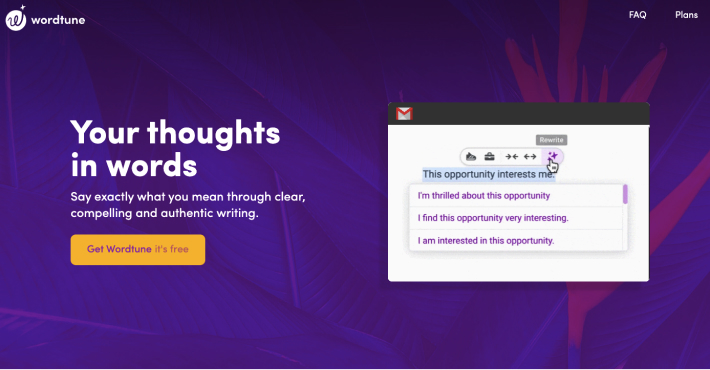
While Wordtune can also create content from scratch, its main focus is to help you quickly rewrite pieces of existing copy as unique content with varying options to lengthen or shorten the copy or give it a new tone of voice.
Wordtune also comes with a Chrome extension for summarizing long-form text, which will take the main points from a blog post, academic paper, or report and produce a short summary. This can be a very useful tool for speeding up research and helping you to understand complex topics.
Features
- Add “spices” to your text by adding a joke, fact, or analogy to make it more engaging
- Includes Chrome extension to find synonyms for words you write in emails, social media, and other places on the web
- Rewrite function makes content original to avoid plagiarism
- Summarize long text and YouTube videos
Pricing
Wordtune offers a free plan, which allows you to rewrite 10 short pieces of copy a day. Premium plans start from $9.99 a month with unlimited rewrites of whole paragraphs and all the features.
Pros and cons of Wordtune for rewriting content
Pros
|
Cons
|
QuillBot
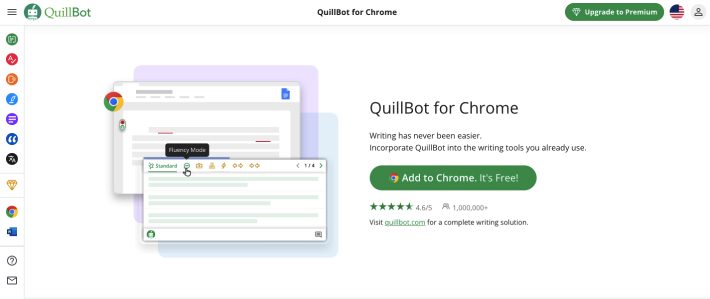
QuillBot is an AI-powered paraphrasing tool that helps you quickly rewrite content to improve grammar and fluency, change the tone of the text, or add more creative ideas.
The tool also includes a plagiarism checker, which will identify any duplicate content and suggest ways to rewrite it or instantly add an accurate citation.
Features
- Translate between over 100 languages
- Summarize text into key sentences
- Generate citations from web pages, journal articles, or books
- Expand, shorten, or improve text in several ways
- Check for grammar errors and plagiarism all in one tool
Pricing
There’s a free version of QuillBot with limited functionality. The premium version includes the plagiarism checker and can paraphrase unlimited text and summarize up to 600 words. Plans start from $8.33 a month.
Pros and cons of QuillBot for rewriting content
Pros
|
Cons
|
WordAi
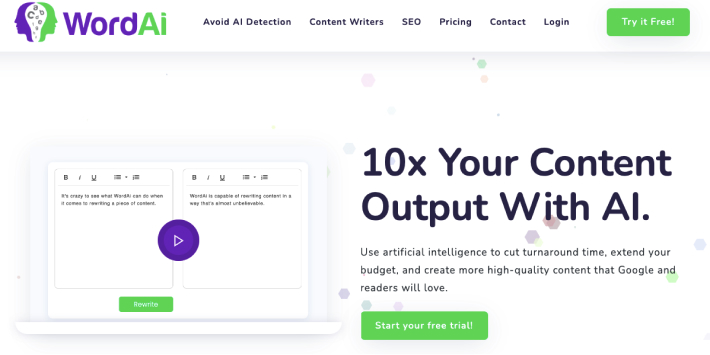
WordAi is a content rewriter that uses AI to restructure sentences, simplify copy into shorter sentences, fix incorrect spelling and grammar, and optimize web content by adding LSI keywords.
The tool also claims to avoid detection by humanizing content so it won’t be flagged as being generated by AI (we’ve not tested these claims).
Features
- Bulk rewrite content
- Each article can be rewritten up to 1,000 times
- Integration with Article Forge to import articles directly
- Improve the quality and clarity of poorly written text
Pricing
WordAi plans start from $27 a month.
Pros and cons of WordAi for rewriting content
Pros
|
Cons
|
The best AI content detection tools
If you choose to use AI-generated content on your website, it’s important to be aware of the potential risks.
Google has stated that automated content generation can be seen as a form of spam and can lead to action being taken against your website, such as penalties or even getting deindexed from search results.
You should also keep in mind that you can’t copyright AI-generated content unless it’s been edited significantly by a human. So, if someone copies your AI-generated text, you won’t be able to take any legal action.
For these reasons, it’s important to run any content you produce through an AI detection tool to protect your brand and reputation.
Originality.AI
This tool was built with web publishers in mind, unlike other plagiarism detectors that are intended mainly for academic content. You can scan any type of document or web copy for duplicated text and AI-generated text at the touch of a button. The accuracy of Originality.AI has been measured at over 94%, depending on the tool that was used to create the content.
Pricing: $0.01 per credit, 1 credit scans 100 words
Pros and cons of Originality.AI for detecting AI-generated content
Pros
|
Cons
|
GPTZero

GPTZero claims to be “the world’s #1 AI detector” with over a million users. The tool will scan text you paste in and give you scores based on randomness and variation to give you an overall determination of whether it’s been created by a human or an AI. Sentences more likely to be written by AI are also highlighted.
Pricing: Free
Pros and cons of GPTZero for detecting AI-generated content
Pros
|
Cons
|
The best AI content idea generators
Perhaps one of the best use cases of AI when it comes to content creation is for idea generation. We’ve all had those times when we’re just stuck for ideas for the next blog post. And browsing the web for inspiration is time-consuming, not to mention the fact that everyone keeps publishing the same ideas over and over again.
You can use AI as a brainstorming assistant to generate new ideas in seconds. As well as blog post headlines, email subject lines, and ideas for social media campaigns, you can also use AI to generate new angles on the same topics.
ChatGPT

ChatGPT is probably the most well-known tool on this list and is responsible for transforming AI content generation from a niche concept to one that is now widely used.
Developed by the team at OpenAI, ChatGPT is essentially an advanced chatbot. Simply ask it a question or give it an instruction and it will generate content outlines, topic ideas, headlines, and even complete pieces of copy.
ChatGPT Features
- Conversational interface enables users to ask questions on almost any topic and carry out a convincing conversation; it remembers topics and can follow along with the conversation, like a human
- Text generation uses natural language processing to mimic content written by humans
- Ability to research and answer questions from its database
- Generate ideas for content quickly, including topics, headlines, and outlines
- Supports over 90 languages
Pricing
ChatGPT is currently in the beta phase and is free to use. OpenAI has recently announced the launch of ChatGPT Plus — a subscription plan that will cost $20 a month and give users better response times and more features.
Pros and cons of ChatGPT for generating content ideas
Pros
|
Cons
|
Surfer SEO
Surfer is a little bit different from most of the tools on this list, as it combines a keyword research tool with the power of AI to help you create content that’s more likely to rank and perform well.
Enter your primary keyword and the tool will analyze millions of pages to recommend new topic clusters and ideas for related content. It then uses AI to generate an outline of your post, including headings, keywords, and even whole paragraphs of text that you can add to your own content.
Surfer SEO features
- Research keyword opportunities to find hot topics and ideas for related content
- AI-powered article outline generator that creates a whole structure for your content
- Automated tips to improve SEO of every piece of content
- New article ideas delivered every week
- Integration with Jasper if you want more AI assistance with writing
- Built-in plagiarism detector
Pricing
From $49 a month for up to 2 websites, 240 page audits a year, and 120 articles a year, with unlimited keyword research and content ideas.
Pros and cons of Surfer SEO for generating content ideas
Pros
|
Cons
|
NeuralText
This is another tool that combines content optimization software with AI text generation to help you to come up with new ideas for content and improve the SEO of your web copy in a single platform.
NeuralText aims to improve on existing SEO tools by using the power of natural language processing to speed up the process of creating content for your website and improving the chance of it achieving a high ranking in Google and other search engines.
Features
- Keyword clustering tool to reduce time spent researching keywords and content ideas
- AI-powered SEO content brief generation
- Replaces manual competitor research
- Get relevant, real user questions sourced from Quora, Google Suggest, and other sources
- Automatically include statistics and data in content
- Generate content ideas, blog post titles, content hooks, slogans, and ideas for social media content in seconds
Pricing
From $19 a month for up to 20,000 words of AI-generated content and 2,000 keyword suggestions.
Pros and cons of NeuralText for generating content ideas
Pros
|
Cons
|
How to improve AI content generation using these tools
Using AI tools for content creation can be a great way to speed up the process and get more ideas and inspiration when you’re drawing a blank, but it’s important to remember that AI is no substitute for human intelligence and creativity.
Rather than relying on AI to do all the work, it’s best to use it as a writing aid instead of a content generator. Some of the new breeds of AI tools are very effective for content ideation and improving SEO without the risk of churning out low-quality, plagiarized content.
With careful use of these AI-powered tools, you’ll have access to an arsenal of features designed specifically for optimizing your web copy and creating high-quality content quickly. There’s no denying that AI offers many opportunities in today’s competitive digital marketplace. But never forget that there’s still no substitute for a skilled writer and that originality, creativity, and human expertise are all key ingredients for success.
AI+Human from Get A Copywriter
Empower your content with Intelligence
and be sure it’s fine for SEO
AI-generated SEO content is the web’s latest trend, but what exactly are the pros and cons of using copy created by AI? And does Google penalize AI content?
Does AI content rank in Google?
Ever since AI-writing tools like ChatGPT began to amaze and disturb the web in equal measure, digital marketing experts and business owners alike have been asking themselves if AI content will rank well in search engines.
The short answer is yes, AI-generated content can rank on Google. But there are several caveats.
Google recently released a statement confirming its views on AI content, after much speculation and debate. Essentially, Google said it took no stance on the use of AI-generated content; instead, it focuses on the quality of content produced by any tool or technology.
The search engine encourages web publishers to create “helpful, reliable, people-first” content and promises to reward such content with higher rankings.
Anyone who’s used an AI writing tool may recognize one immediate cause for concern on this list: reliability.
Generally speaking, AI’s output can be inaccurate and, in some cases, completely false. AI technology uses sophisticated algorithms to emulate content that a human would write. But as of the current time, most tools don’t have any systems in place for checking that the text they write is actually correct.
Google also warns that auto-generating content for the purpose of manipulating search engine rankings is against its spam guidelines. And yes, that means AI SEO content writing.
Essentially, if you’re using AI to bulk-generate content for the purpose of stuffing keywords or keyword phrases into a page in order to boost rankings, Google will almost certainly notice and respond accordingly.
Overall, it appears that AI technology is not facing an outright ban from Google’s search engine. But as always, if you’re using AI to generate content for SEO purposes, make sure you check it carefully for accuracy and ensure it adds value to the reader before publishing.
Is AI-generated content good for SEO?
AI tools can certainly be helpful when it comes to content optimization. By analyzing and understanding the content of a document, AI technology can detect keywords and phrases and suggest ways to improve readability for both humans and search engine bots.
However, it’s important to remember that automated tools are only meant to be used as an aid in creating content. They should not replace human input when it comes to producing quality SEO content.
Most AI tools on the market right now will lean towards keyword-stuffing when asked to include particular terms in an article. This is why it’s so important to review content created by AI tools with a human editor before publishing.
If you use AI as an assistant to help you improve the SEO of your content, it can speed up the process, improve your efficiency, and make sure you include all of the important keywords. But when it comes to putting together a well-written, informative article that also helps boost your search engine rankings, there’s no replacement for a human writer.
Disadvantages of AI content for SEO
We’ve already touched on a couple of the drawbacks of relying on AI software to write content for SEO purposes.
But it’s important to consider all the potential issues before using a tool for AI SEO writing. AI-generated content is a relatively new technology and, as such, is still largely unregulated.
It’s probable that guidelines, regulations, and laws around the use of AI content will start appearing in the next few years. Until then, it’s critical to stay aware of the risks and take steps to ensure you’re using AI in a way that is unlikely to damage your business or your reputation in the future.
Inaccurate and misleading content
As mentioned above, accuracy is a huge problem in most existing AI writing tools. All facts, data, references, and other factual information included in AI-generated content must be carefully checked and double-checked before being published.
Google is constantly striving to provide the best possible user experience for searchers, and being given incorrect information or made-up facts would definitely not meet that goal. Therefore, it’s critical to ensure that the content you put online is factually correct, or it runs the risk of being flagged and earning you a penalty.
AI vs. AI and writer vs. professional writers:
the ultimate comparison
Explore the key features of all approaches to writing content
and find out what works better for your business.
Your email is safe with us
Unnatural language
Another issue with AI-generated content is its tendency to be overly keyword-dense, as well as its lack of natural language flow. This can make any content generated this way appear robotic and unreadable, which won’t do your search engine rankings any favors.
Google has previously issued several algorithm updates penalizing “over-optimization,” so don’t make the mistake of letting the AI take over. Content written for humans (and by humans) is always better for SEO than content written for search engines.
Potential plagiarism and duplicate content
AI-generated articles are often built from pieces of text that already exist online, which may put your website at risk of plagiarism or duplicate content penalties.
It’s also possible that two different people entering the same prompt into an AI tool could end up with nearly identical articles. This could spell disaster for your SEO if your site is the weaker and less authoritative of the two.
Uninspiring content that lacks creativity and flair
Great SEO content is about more than just keywords. The most successful articles online are written by talented writers who know how to tell a story and capture the attention of their audience.
These articles are rewarded with clicks, likes, shares, and links: all clear indicators to Google and other search engines that the content is important, authoritative, and valuable.
AI content, on the other hand, can often be dry and uninspiring. It may get the job done, but it won’t do anything to engage your audience or keep them coming back for more.
While AI-generated SEO content might achieve a decent ranking for a low-competition keyword, it won’t perform as well for more competitive phrases.
How to use AI content on your site without harming your SEO
An AI writing assistant can be a valuable tool when used correctly. AI can speed up your content production, offer optimization advice, and help you come up with new content ideas. But relying on pure AI-generated content for your website is a recipe for disaster.
Here are our top tips for ensuring that your use of AI content is helping rather than hindering your website’s search engine rankings:
- Always check content for accuracy and readability: Don’t just publish what the AI tool gives you. Make sure all facts and data are correct and double-check for grammar, spelling, and natural language flow.
- Don’t give AI writing tools your keywords: AI SEO content generators love to overstuff keywords. Instead, let the AI tool generate a first draft with basic prompts and then expand on and optimize it yourself.
- Add your own stories, ideas, and experiences: Humanize the content by adding a bit of your own personality. This makes it more engaging to read and more likely to be shared.
- Consider other uses of AI: AI can help you find powerful keywords, outline article structures, and suggest content ideas. These uses are far less risky than relying on it to generate full articles.
- Use AI to assist in writing meta titles and descriptions: One writing task that AI is already pretty good at is creating short snippets like meta titles and descriptions. This is an easy way to speed up your content production process and improve your SEO at the same time, although you’ll still need a human to proofread and edit them.
- Don’t let an AI tool write your entire website: AI tools are great as a writing assistant, but it’s easy to end up with generic, uninspiring content if you rely on them too much.
AI+Human from Get A Copywriter
Empower your content with Intelligence
and be sure it’s fine for SEO
Use AI for SEO with caution
AI content, when not monitored and edited by humans, can be detrimental to your website’s SEO. Without the expertise of a human writer, AI-generated content often lacks depth and accuracy, making it less engaging for readers and less appealing to search engines.
When used as intended (as an assistant, not a full automation tool), AI can be a valuable asset to any content strategy. But you’d be wise to stay aware of the risks and limitations of using AI-generated content. Using these tools to help you during the copywriting process, rather than using fully auto-generated content, will ensure that your SEO isn’t put at risk and instead is benefiting from the help of AI technology.
What is AI-generated content?
AI tools like ChatGPT and Jasper create content at the click of a button with a simple prompt or instruction such as “write a definition of artificial intelligence” or “list some reasons why AI is beneficial.”
This type of AI-generated content has seen a rapid rise in popularity and usage in recent years, due to the release of increasingly sophisticated tools. These AI writing assistants speed up content creation, allowing marketers to rapidly create web content, blog posts, social media messages, and other types of content, all without hiring a professional writer.
But AI content tools are not without their controversies. One of the biggest concerns at the moment is whether or not Google and other search engines can detect AI-generated content. And if so, will they penalize websites that use it?
How does AI-generated content work?
The process behind the creation of automated content is referred to as “natural language processing” (NLP). This involves algorithms analyzing natural language and seeking out patterns in texts. The software then uses this data to generate new and unique content automatically.
Most of the AI tools available today use a technology developed by OpenAI called GPT-3 (Generative Pre-trained Transformer 3).
GPT-3 is OpenAI’s latest achievement and the most powerful AI language model to date, with over 175 billion parameters. GPT-3 is trained on internet datasets up to September 2021. In other words, it does not scrape the web in real time and has no knowledge of recent events.
Instead, the model was trained by being fed content such as blog posts, news articles, online discussion forums, and more. After learning to recognize patterns in these inputs, GPT-3 can generate text that is very similar to human-written content.
We all know how fast the world of technology moves, and GPT-4 is already almost ready for public release. While we don’t know the details yet, it’s expected that the new language model will be more advanced in several ways. However, the CEO of OpenAI has warned not to speculate about what these potential improvements may be.
AI-based content vs. professional content writers: who wins?
AI-generated content is fast, cheap, and efficient. But it’s not the best option for every type of content.
Time
A skilled writer may take several hours to write a blog post or several days to research a topic thoroughly. AI tools can generate content much faster.
Cost
A professional writer may charge several hundred dollars for a single blog post or article. Many AI tools are relatively inexpensive, and some, like Chat GPT, are currently free.
Quality
Professional writers have a deep understanding of language and style, as well as in-depth knowledge of their areas of expertise. AI-generated content is not as detailed or accurate. It can be improved with human editing and review, but it does not match the quality of a skilled copywriter.
Uniqueness
AI-generated content may be technically created from scratch, but it’s not unusual for it to be extremely similar to other pieces of content on the web. Some users have reported instances of plagiarism when using AI tools. Professional writers, on the other hand, will always strive to create fresh, original content from a unique point of view.
Get our detailed comparison guide to AI, a combination of AI and writer, and professional content writers so you can make the best choice for your business.
AI vs. AI and writer vs. professional writers: the ultimate comparison
Explore the key features of all approaches to writing content and find out what works better for your business.
Your email is safe with us
How to detect AI-generated content
Content created by AI may seem very similar to text written by a human at first glance. But there are a number of methods you can use to get a good idea if what you’re reading was written by a person or an algorithm.
Tools for detecting AI content
There are several tools now available that will scan content for signs of AI-generated text. These tools look for telltale patterns and language usage that indicate the text was written by an AI rather than a human.
Some examples of tools currently available include Originality.ai, Copyleaks’ AI Content Detector, and OpenAI’s own AI Text Classifier.
These tools are not yet 100% accurate, but they are improving all the time as algorithms become more advanced.
AI watermarking
Watermarking methods have also been discussed as a potential way to detect AI-generated content. These digital watermarks are still being developed, but they could eventually be used to identify AI-generated content with high accuracy.
Manual AI detection
As well as these automated tools, there are also ways to manually check for AI-generated content. None of these methods are foolproof. But if you know the signs to look for, you can usually get a feel for whether content was written by a human or an AI.
Repeating words and phrases
AI tools love patterns — both looking for them and creating them. So if you come across a piece of text that repeats words or phrases unusually often, or keeps repeating the same idea worded in a slightly different way, this is a red flag.
Unnatural or awkward phrasing
AI-generated content may be grammatically correct (sometimes it’s not!), but it often lacks the natural flow and rhythm of words written by a human. If a piece of text seems to have a slightly robotic tone to it, it’s usually a sign that there’s been some AI involvement.
Lack of detail
Content produced by AI writing tools tends to stick to the facts and is usually written in a straightforward style with little detail. If a piece of content lacks explanation or fails to address the issue in any real depth, then it could be AI-generated.
Incorrect facts or made-up data
AI tools can be trained to generate correct outputs based on certain inputs. But they are not infallible and may get some facts wrong or even invent quotes or statistics. If you’re suspicious about a particular piece of content, it’s worth doing some research to see if the facts check out.
Can Google detect AI-generated content?
Google’s algorithms and coding teams are some of the most advanced in the world, and the search engine is constantly being updated and upgraded with new capabilities.
So it’s probably safe to say that if there’s any way to detect AI-generated content, Google surely knows about it. However, the company has not made any public statements about this specifically.
For now, it’s best to assume that Google is fully aware if you’re publishing AI-generated content on your website, especially if you’re not editing it or making any attempt to personalize it.
While currently there’s been no definitive statement from Google to say they will penalize sites using AI content, they’re firm in their stance that all content should be unique and of high quality — both qualities that are often lacking in auto-generated web copy.
But how exactly does Google treat AI content? And how can you ensure your site won’t be penalized and that any potential risks of using AI tools are minimized?
Is AI content worth the risk?
Now you have a better idea of how exactly AI writing tools work and what Google thinks of AI-generated content, it’s time to decide whether it’s something you want to invest your time and money in.
AI-generated content offers some significant advantages for businesses, including lower costs, faster production times, and scalability. But any text written by AI should never be used without human proofreading and editing. Instead, it’s better to use it as a way of generating ideas and as an assistant for producing a rough first draft.
In the near future of digital content where countless billions of words are published each day, originality, creativity, and that elusive human touch are all going to be essential for success online.
AI+Human from Get A Copywriter
Empower your content with Intelligence
and be sure it’s fine for SEO
Content marketing is one of the best ways to reach your target audience in a non-intrusive way.
Since content provides value, it allows you to enter your customer’s lives seamlessly and on a regular basis.
But, just like other marketing methods, there’s a difference between how you market to B2C and B2B audiences. They have different needs, different ways of engaging with your business, and they hang out in different areas online.
Today, I’m going to break down 10 powerful B2B content marketing strategies for you to take advantage of.
You will learn:
- How to map out your sales funnel
- How to create the right content to engage your audience
- 8 promotion strategies to get eyeballs on your content
Let’s get started:
Previously mentioned tactics to implement
Before moving into the B2B strategies, I want to point you to some that overlap.
In our previous article breaking down a 9-step content marketing plan that any business can use, we wrote about different tactics that can be used in both B2C and B2B markets.
Here are those tactics:
- Use an editorial calendar to stay organized
- Optimize your website to generate leads
- Forum marketing
- Share your content in niche communities
- Find people who have shared similar content using Topsy and reach out to them
- Build backlinks to rank your content in search engines
- Analyze your strategy’s results and iterate
All of these can be viable tactics to implement. So don’t forget to check out the article and give them a shot if you haven’t already.
On to the first B2B content marketing strategy:
Use these strategies to market to B2B audiences effectively
Click to tweet
1. Map out your sales funnel
When most people think about a sales funnel, they imagine this picture:
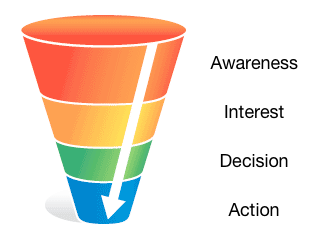
Image source: Build My Online Store
While it’s a good overview, this image skips over the detail that goes into a well-oiled funnel.
Let’s map out that detail quickly:
From prospect to lead
- Prospects read your content
- They see your lead magnet and opt-in
- They have a desire for it and enter their email address
- They join your email list, become a lead, and consume your lead magnet
From lead to customer
- Leads read more of content
- They learn more about your business
- They get to know the products and services you offer
- They have a desire for your products and services
- They weigh their options between you and your competitors
- They trust you the most and decide to buy your product or service
All of this involves a nurturing process. And the best way I’ve seen to nurture prospects and leads is through email.
It’s a direct line of communication in one of the top marketing channels that people check almost every day. It also facilitates an intimate one-on-one communication that can get much deeper than social media.
Thanks to email autoresponders, the nurturing process can also be automated (for the most part).
Here’s what needs to happen in your funnel:
1. People enter it once they visit your website
This means your website is optimized to generate leads with opt-in boxes and lead magnets.
2. Once they’ve joined your list, they get sent a series of emails that provide value.
This usually involves useful content related to your products and services.
Here’s an example spreadsheet breaking down an email autoresponder sequence:
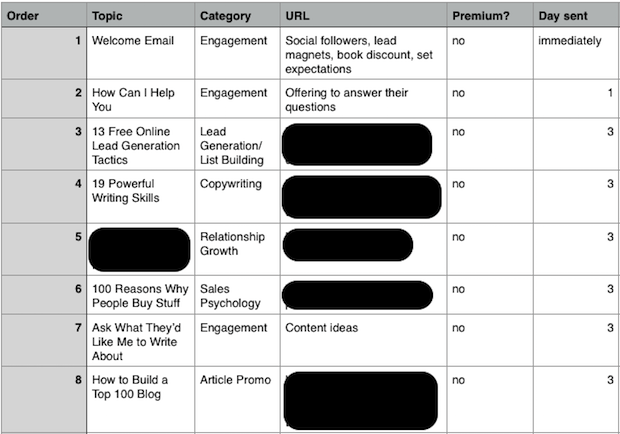
Notice that most of the emails are useful content, but some are for engagement and relationship growth. These emails simply encourage your audience to ask questions and engage with you.
This helps them get to know your business and trust you.
3. Promote your products and services
Somewhere within this series, you’ll want to promote your products and services.
Treat it like you’re emailing a friend to let them know that they’re available and can provide a lot of value.
Since these people have had time to get to know your business, this a much easier sale than it would have been at the top of the funnel.
4. Establish loops
A percentage of your leads won’t buy at this point. So it’s important to establish loops that bring them back and keep them engaged with your business until they’re ready to buy.
To do this, you can simply extend the autoresponder to include more content and engagement emails. Then promote them again further down the line.
(Or you can set up special promotions for people who haven’t bought yet.)
This is where you can be creative and tailor it to what will work best for your business.
Get together with your team and map out the customer journey, starting with prospects engaging with your content.
Which brings us to Strategy #2:
2. Research content that will resonate with your audience
Here’s the thing:
If you don’t create the right content, you will attract the wrong people.
Content naturally filters in/out the people who have a desire to read it. Your job is to research and identify topics that will resonate with your audience.
In B2B content marketing, this content usually involves in-depth tutorials and guides that help your prospects get results for their business.
These guides cater to pain points your prospects face, so the key to creating the right content is to identify your audience’s pain points.
Here are 4 methods to do this:
1. Survey your audience
The best way to get feedback from your audience is to ask them directly.
One way is to create a survey using Google Forms and send it to your email list.
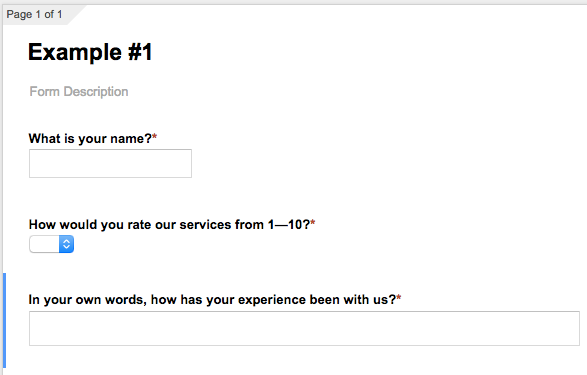
This will make collecting their answers quick and painless.
Another way is to install Qualaroo. It’s a service that lets you install pop-up survey forms on your site so you can gather data from your visitors in real time.
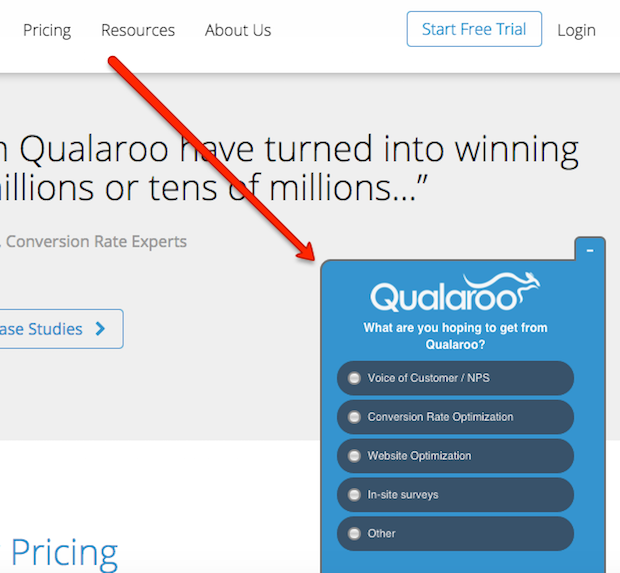
Make sure to ask closed and open-ended questions so you can gather hard data, as well as see the language your audience uses to describe their situation.
2. Read through discussions in online communities
Online communities, like forums and LinkedIn groups, are treasure troves of information.
This is where people discuss their problems, ask for advice, and share their knowledge over the Internet. They’re perfect places to research your prospects.
First, create a list of online communities your target audience hangs out in. These could be:
- Forums
- LinkedIn groups
- Google+ communities
- Facebook groups
- Niche communities (like Inbound.org or GrowthHackers)
Once you’ve got your list, create a spreadsheet like this:
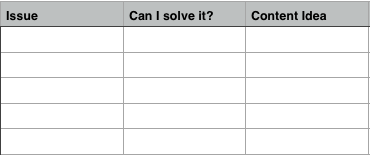
Spend some time sifting through the conversations. Jot down the issues people are having, whether you can solve it, and a piece of content that would fulfill that need.
Continue doing this until you’re satisfied with the ideas you’ve come up with.
3. Keyword research in your industry
Keyword research is also in-depth market research.
Where else do people type in their most profound problems in hopes of finding a solution?
Thankfully, all of this data is also available for free using Google’s Keyword Planner.
Simply head over to the planner and type in a few broad terms related to your target market’s niche:
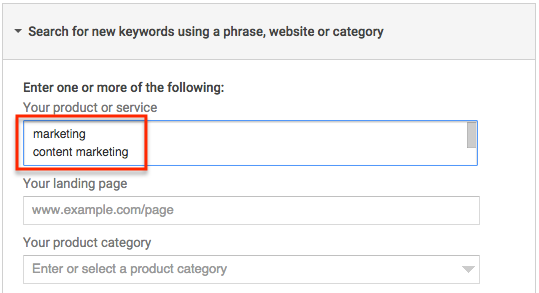
Then click the “Keyword Ideas” tab and scroll down.
Here, you’ll find hundreds of related keywords:
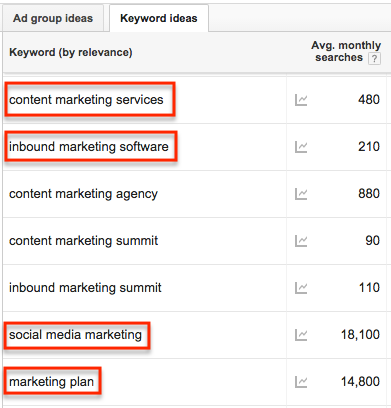
These are all terms that your potential customers are typing into Google.
Go through these keywords and find ones that 1) you can create content around and 2) have a sizable search volume (300+).
4. Reach out to individuals on social media
To gather your final bits of data, reach out and engage with people on social media.
Ask them what they’re struggling with. Ask them if you can help with anything.
This interpersonal communication will often give you some of the most revealing insights into your audience. Not to mention some great content ideas.
Take all of these pain points and brainstorm content ideas to cater to them. This will make sure the content you create will resonate with your audience and attract the right people.
Once you’ve created your content, it’s time to promote it and drive traffic.
The following B2B content marketing strategies will help you get eyeballs on your content.
3. Promote your content in linkedIn groups
LinkedIn is a B2B content marketer’s heaven.
The social network is entirely devoted to working professionals, and LinkedIn groups provide the perfect avenue to reach them.
These groups are filled with hundreds, thousands, or hundreds of thousands of people all discussing different topics. They’re primed to want and need your content.
All you have to do is show it to them.
Here’s how:
First, go to LinkedIn and do a search in the top bar for a keyword related to your target market’s industry. Then click “Groups” in the left sidebar:
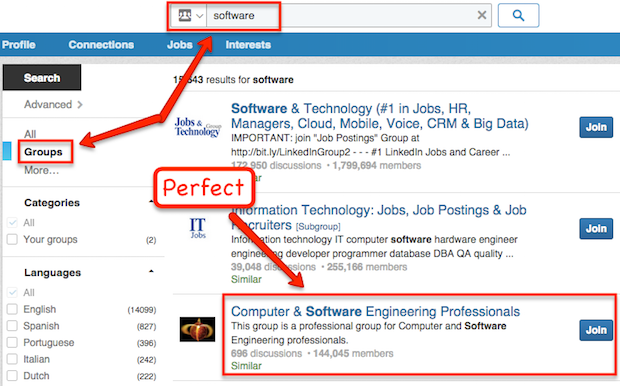
Join any that might contain potential prospects. You can usually tell by the name of the group or their description.
Then simply post your content as a new discussion:
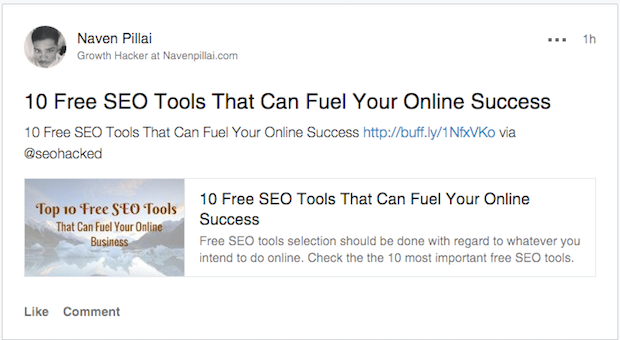
People in the group will usually get notified within LinkedIn that there’s a new post and/or they’ll receive an email direct to their inbox.
These groups can get crowded, so make sure your post has a catchy headline.
4. LinkedIn lead prospecting and outreach
Posting in LinkedIn groups is a great shotgun approach to get eyeballs on your content.
But you can also use a more direct method to target specific prospects. It involves finding individuals on LinkedIn that would make good leads and sending them some useful content to get the conversation going.
Here’s how to do it:
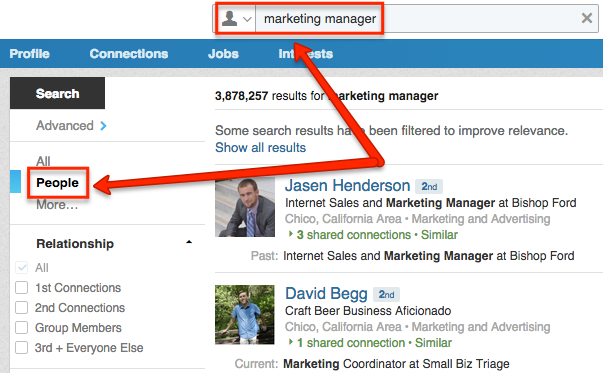
First search for an occupation your lead might have. Then click “People” in the left sidebar:
Then select “1st Connections,” “2nd Connections,” and “Group Members.”
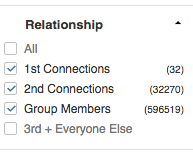
This will pull up all of your 1st connections, 2nd connections, and group-mates who work as your target occupation.
For your first connections, click “Message” next to their name and send them a message that goes something like this:
Hey [NAME],
Hope you’re doing well.
I noticed that you work in [FIELD] and thought you might like to check out my latest article.
It’s an in-depth guide that helps [OCCUPATION] get [RESULTS].
Here’s the link: [URL]
Just thought you might get a kick out of it.
All the best,
[YOUR NAME]
P.S. If you have the time, I would love to know your thoughts on the article.
This email isn’t pushy and doesn’t involve any selling. It opens the door to start a conversation.
It also drives traffic back to your website that’s already optimized to generate leads, so these people might become leads immediately after this point.
If not, sometimes the conversation needs to deepen. Continue by discussing what they do and what problems they’re having. Then send them more content that might help.
As you build a relationship, start discussing how your paid products and services could be beneficial, but push them to opt in for a lead magnet and get their feet wet.
Remember, in B2B communication it’s all about one thing:
Results.
What results can your content deliver? What results can your lead magnet deliver? What results can your products and services deliver?
This will do the selling for you.
Reaching out to your 2nd connections and group members is a little trickier, because unless you have a premium LinkedIn account you can’t message them directly.
What you can do is click the “Connect” button next to their names. This will send the generic LinkedIn connection message:
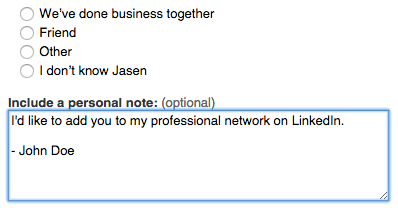
For most people this isn’t ideal because, most likely, you will get a low success rate.
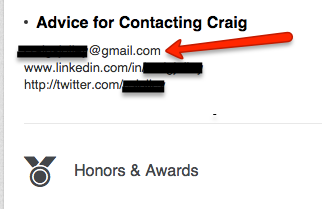
If you don’t want to use this route, try going to their LinkedIn profile and look for an email address:
If you find one, select “Other” when connecting with them and input their email address:
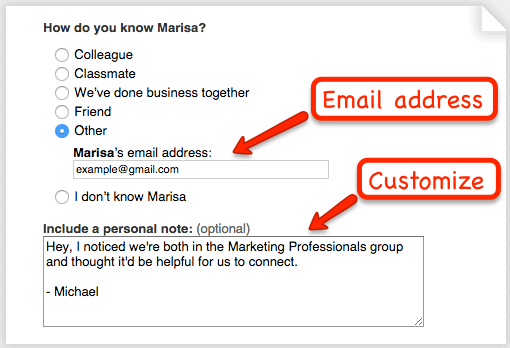
Then customize the message to say that you noticed you were 2nd connections and/or members of the same group and you thought it would be helpful to connect.
If you don’t find an email address on their profile, identify the company they work for and go to their website.
Then use Voila Norbert to connect their name with their company email address:
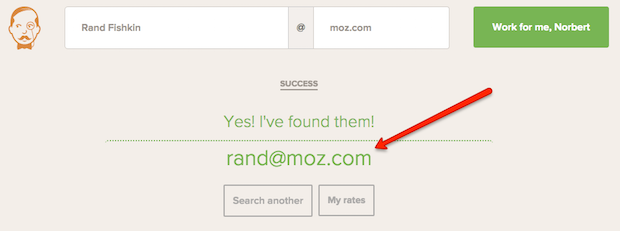
If it finds it, go back to your LinkedIn connection request, select “Other,” then customize the message and send the request.
When you connect with someone, send a message introducing yourself. If they respond, send another message containing your initial piece of content.
This is a good way to proactively grow your LinkedIn connections and generate leads at the same time.
5. Use BuzzSumo and Buzzstream together for content promotion
BuzzSumo and Buzzstream are two of my favorite content promotion tools.
BuzzSumo is a search engine that helps you find the most highly shared content for a given search term.
Buzzstream is an amazing tool for streamlining email outreach.
These tools in conjunction become a content promotion powerhouse.
You’re going to do three things:
- Identify the most highly shared content that’s related to your own
- Identify exactly who shared it
- Reach out to those people and promote your content to them
This works because these people have already shared something similar. They have a desire for this content and a willingness to spread it.
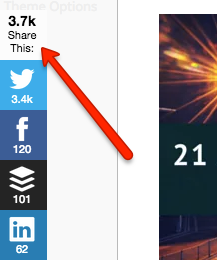
I use this strategy to drive traffic and get hundreds (and sometimes thousands) of social shares when I post new content:
Here’s how to do it:
First, create free trial accounts for both BuzzSumo and Buzzstream.
BuzzSumo is free to use, but we will need to use an upgraded feature. Buzzstream is a paid subscription, but they offer a free trial as well.
Next, head over to BuzzSumo and type in a keyword related to your content:
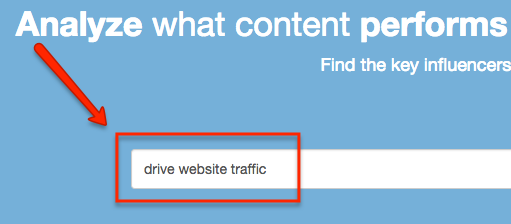
This will pull up the most shared content associated with your keyword:
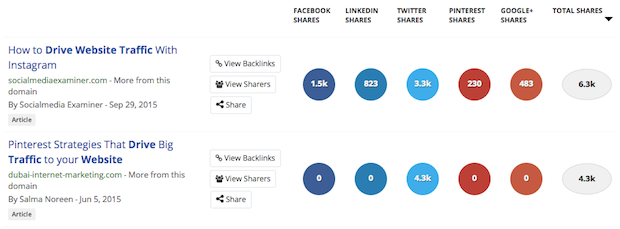
Then click on “View Sharers” for the first piece of content. You will be shown all of the people who shared it on Twitter.
Use the “Export as CSV” button to export your list as a CSV file.
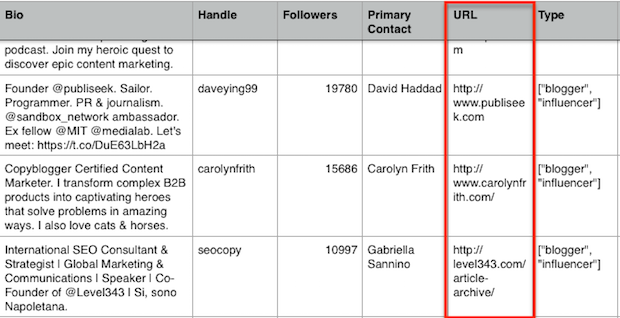
Once you’ve downloaded it, you will have a host of data for each Twitter account. Filter it so the accounts with websites connected to them are grouped together first:
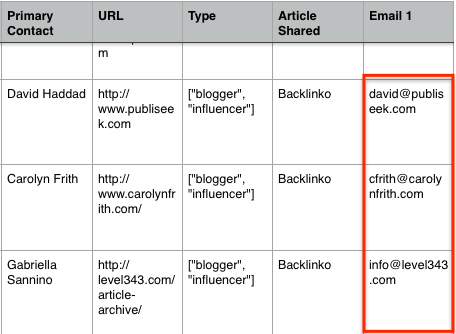
Visit each website, find the person’s contact information, and add it to the spreadsheet:
Pro Tip: If finding emails is taking a long time, you can hire someone for $4/hr on Upwork (formerly Elance) to do it for you.
Then make sure your spreadsheet is saved as a CSV file.
Go into BuzzStream and create a new project:

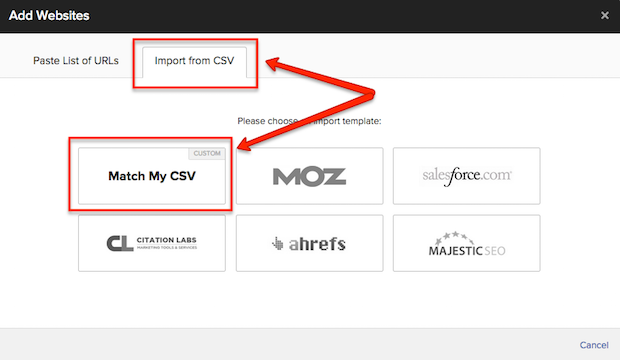
Then click “Add a List of Websites” → “Import From CSV” → “Match My CSV”:
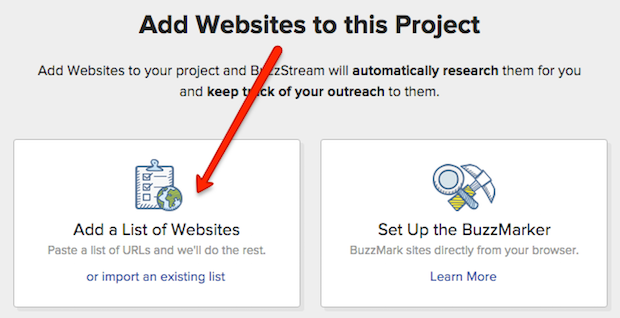
Make sure the data fields match up like this:
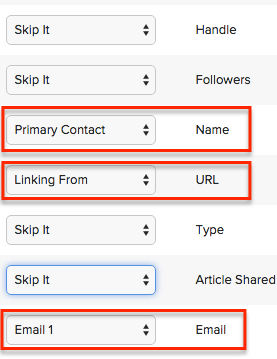
Then click “Import These Contacts” and wait for Buzzstream to email you when it’s finished.
When complete, head into the project and click “Outreach” → “Create Template”:
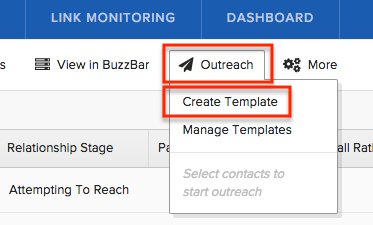
Then create an email template like this:
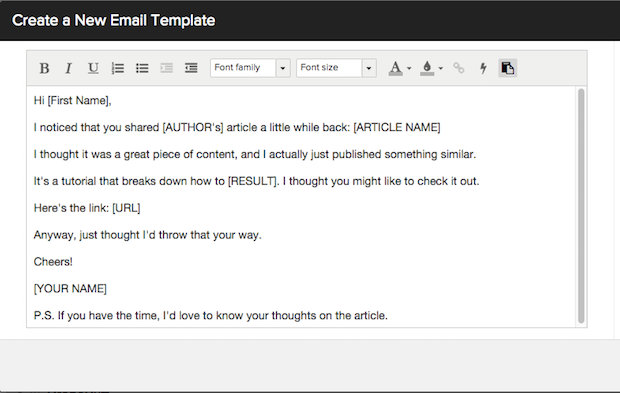
Make sure to save it. Then go back into your project and select all of your contacts. Then click “Outreach” → “Start Outreach” and select the template you just made.
Buzzstream will pull up a window that lets you send off your premade template to all of the people in your project.
It automatically pulls up details like subject line, email address, and first name:
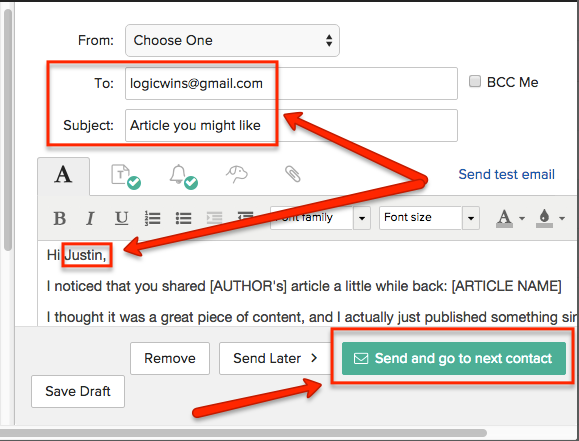
All you have to do is click “Send and go to next contact” and Buzzstream will fire off that email and load up the next one for you.
It’s an excellent way to promote your content to a lot of people in a short amount of time.
Not only will these people visit your site and possibly become leads themselves, but they’ll likely share your content and attract even more people to you.
To scale this even further, download as many sharers for as many pieces of content as possible before your free trial of BuzzSumo runs out (or purchase the full version) and you’ll have thousands of people to promote your content to.
6. Promote your content in Google+ communities within your target market’s niche
Just like LinkedIn groups, Google+ communities are filled with people discussing and sharing content about different subjects.
While it isn’t as B2B focused as LinkedIn, “Google+ users are mostly marketers, industry experts and business owners of any kind. In a way, that makes it almost as professionally oriented as LinkedIn” (Business2Community).
These communities are HUGE. Check out these numbers:
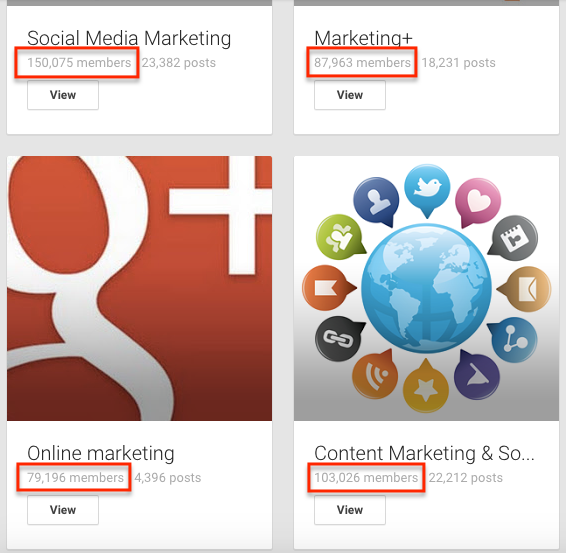
This means whenever you share your content here, you’re exposing it to tens of thousands of people in an instant (sometimes 100,000+).
Here’s how to promote your content in Google+ communities:
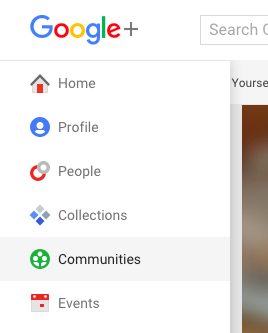
First, use the left sidebar to select “Communities.”
Then search for a keyword related to your target market:
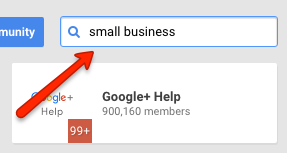
This will pull up a list of communities. Join as many as you like that have a good amount of members.
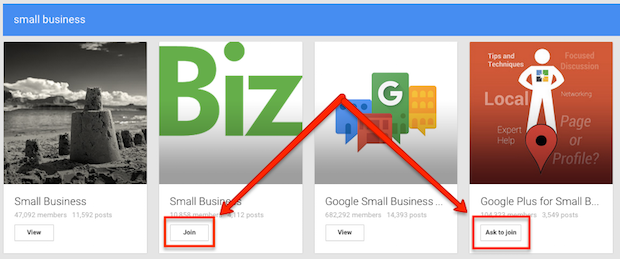
Once you’re in, simply visit each group and share your content.
In a couple sentences, write a benefit-oriented description that compels people to click through.
Give a few reasons why they should read your article:
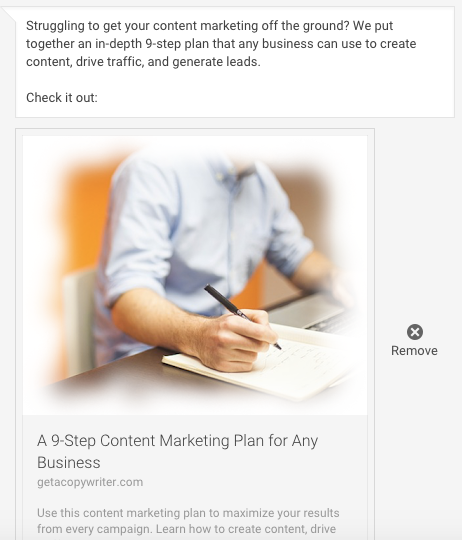
It’s a quick way to expose your business to a large amount of people who may have a desire for your products and services.
7. Facebook advertising
Facebook advertising is one of the best ways to reach your target audience quickly and efficiently.
Facebook has collected loads of data on its users. Marketers can use this data to hyper-target their advertising based on location, interests, whether prospects have visited your site, and even the car they drive.
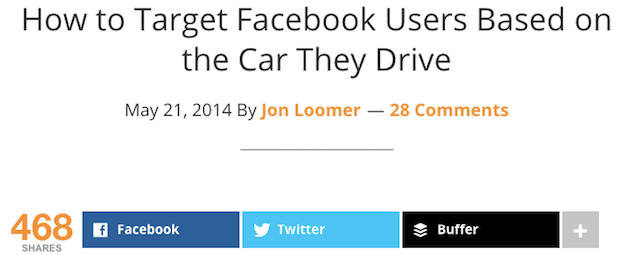
Needless to say, this level of targeting is powerful.
There are many types of campaigns you can run, but here are three of my favorites:
- Lead generation campaigns
- Retargeting campaigns
- LookaLike audience
Let’s break down each one:
1. Lead generation campaigns
The goal of a lead generation campaign is to build your email list and send people into your sales funnel.
You can collect other information as well (such as occupation and revenue) if it’s important to your lead nurturing process. Just know that this might lower your conversion rates.
Here’s the process:
- Create a lead magnet
- Set up a landing page
- Install the Facebook pixel
- Set up a campaign
- Drive traffic to the page
First, you need to create a lead magnet. If you don’t have one already, these make good lead magnets:
- Free ebooks
- Free trials
- Checklists
- Mindmaps
- Lists of resources
- Mini-courses
- Anything of value to your audience
Make sure your lead magnet can be delivered automatically when someone converts.
Here’s an example:
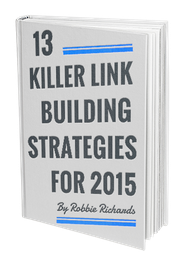
It’s a free ebook on link building that’s great for anyone with an interest in SEO.
Once you’ve created a lead magnet, it’s time to set up a landing page.
Landing pages have one goal:
Convert visitors.
That’s why many landing pages don’t have external links, sidebars, or headers, because the only two choices you want are 1) to convert or 2) hit the back button.
Here’s an example from the previous lead magnet:
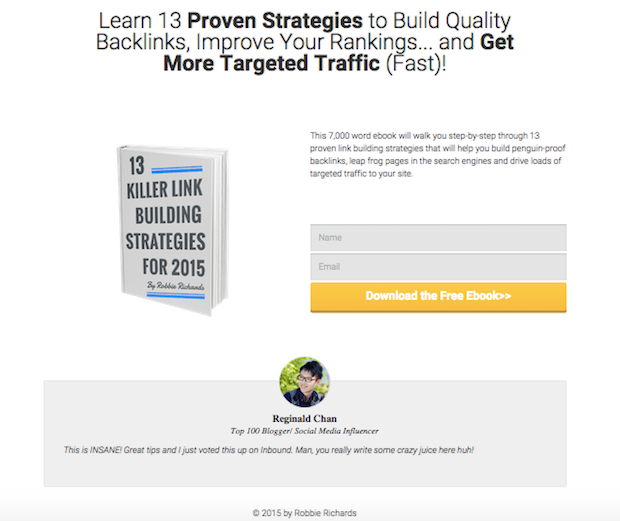
Robbie decided to collect each person’s name as well.
In general, the more info you ask for, the lower your conversion rates are, but maybe he tested it, and this version got higher conversions. This extra information may also be an important part of his larger business strategy.
So take these two points into account when creating your landing page.
I personally use Thrive Content Builder to build landing pages, because it’s the best product with a one-time fee I’ve found.
But other popular alternatives are LeadPages and Unbounce. Research a few and pick the one that will work best for you.
Then build out your landing page. Include a compelling headline to entice readers to opt in, opt-in field(s), and a call to action button.
Next, you want to install a Facebook pixel on the page. This lets you track conversions and how well your ads are performing.
Here’s a tutorial for Facebook’s new pixel. It’ll walk you through the setup process.
Once that’s installed on the page, it’s time to set up your Facebook campaign. I like to use the Power Editor rather than Facebook’s ad manager to do this.
It has a more robust interface and a higher word count limit for your ad’s descriptions.
Head into the Power Editor and create a new campaign:
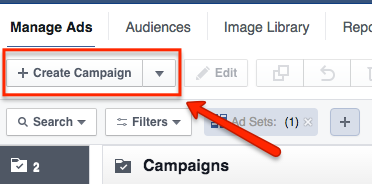
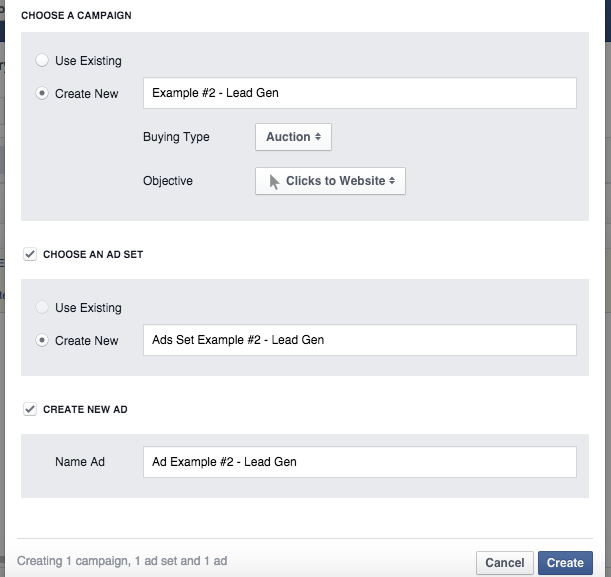
Then create a name for your new campaign, ad set, and ad. Then select “Clicks to Website” as the objective and click “Create”:
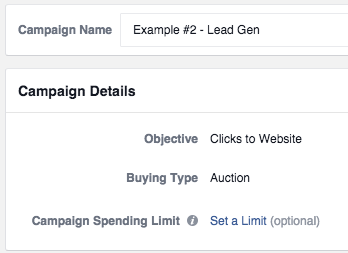
Leave the “Buying Type” as “Auction”:
Next, click the ad sets tab on the left, select your new ad set, and click the edit button:

Set either a Daily or Lifetime budget for your ad and when you would like it to start/end:
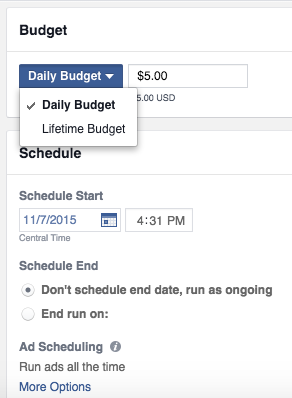
Then move down to the Audience section and click “Edit Audience.”
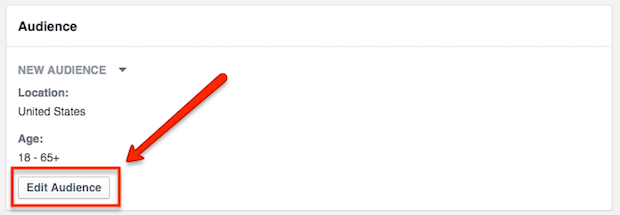
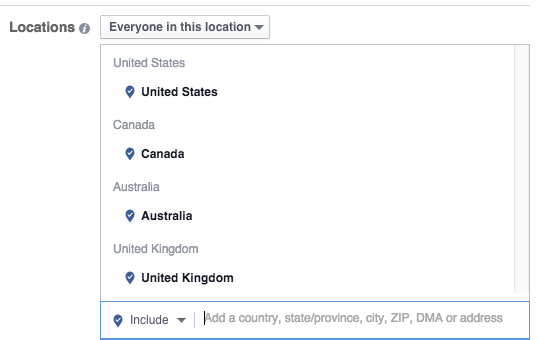
For this campaign, we’re going to target people by location and interests. The next two campaigns will change up the targeting to be more specific.
First choose where you’d like to display your ad:
Then select the age and gender you’d like to market to, languages they speak, and brainstorm interests your prospects might have:
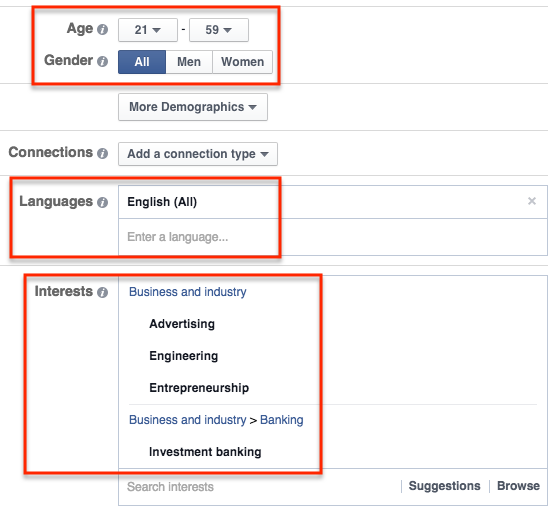
Ignore the rest unless you know specifically that you want to target the other metrics.
Then click “Save.”
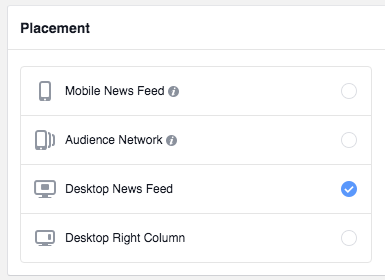
Next, choose where you want to place your ads. In my experience, “Desktop News Feed” gets the best ROI, but again, you won’t know what works best until you test it.
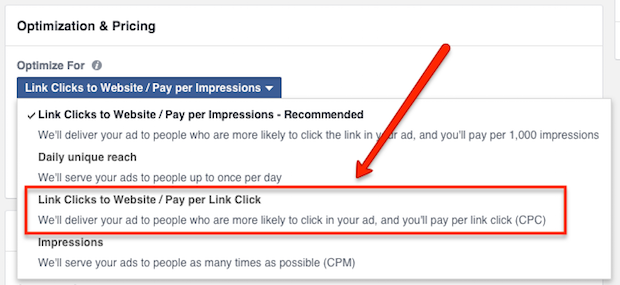
Scroll down and make sure you’re paying per click to your website (rather than impressions):
That’s it for targeting. Go ahead and close this editor, because it’s time to edit your ad.
Go ahead and click the ads tab on the left, select your new ad, and hit the edit button:

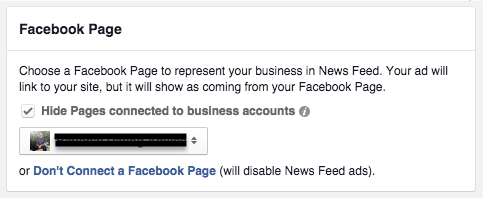
First, choose a Facebook page to represent your ad:
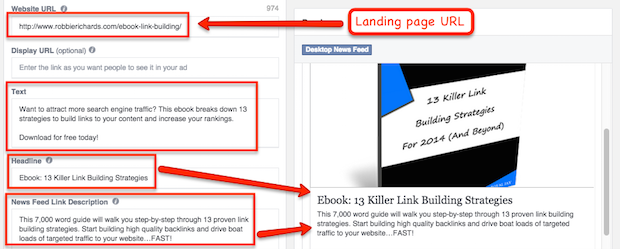
Then copy and paste your landing page’s URL as the “Website URL,” write up a few sentences that compel your prospects to click through, a headline for the ad, and a benefit-oriented description:
Then scroll down and choose an image for your ad.
All of these areas play critical roles when people decide whether or not to click through to your website.
Just like when you were reaching out to prospects on LinkedIn, results will do the selling for you.
Finally, set the call to action button as “Learn More” and set up tracking if you’d like to track link clicks in a 3rd party program.
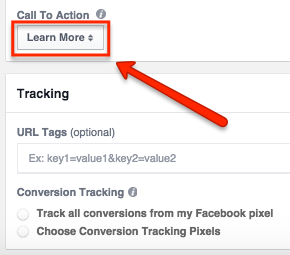
Your final ad will look something like this:

Now, you can leave it at this. But I prefer to set up two different ads to split test aspects like image and copy.
So, go back into the main ads section, select your ad, and click the “Duplicate” button:
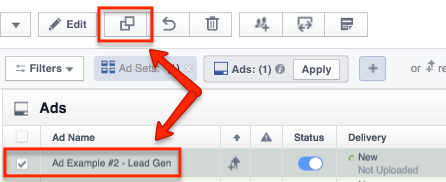
This will duplicate the ad once. Do it again to have 3 total ads in this ad set.
Then edit your two new ads and change up the images and copy. Midway through your campaign, pause the lower performing ad(s) and keep the higher one(s) running.
Before your ads can run, you have to upload them to the regular Facebook ad manager, so click “Upload Changes” at the top and check your account to make sure they’re going to start on the date you selected.

Then you’re good to go! Just wait for your ads to start running and check back periodically to see how they’re performing.
2. Retargeting campaigns
The next type of Facebook advertising campaign are retargeting campaigns.
These campaigns are special because they allow you to send ads to people who have already visited your site and are familiar with you.
You can even send them to people who have visited specific pages on your site but not others. Like people who visited your sales page but didn’t visit your confirmation page (people who didn’t buy).
You can get really creative with these campaigns.
But first, Facebook needs to collect data from your visitors before you can retarget them. To do this, install the Facebook pixel across your website and let it collect this data for a few days.
Once Facebook has it in it’s database you’re ready to rock.
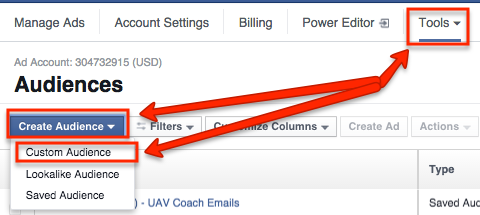
Head over to the regular Facebook ad manager and click “Tools” → “Audiences” → “Create Audience” → “Custom Audience”:
Select “Website Traffic”:
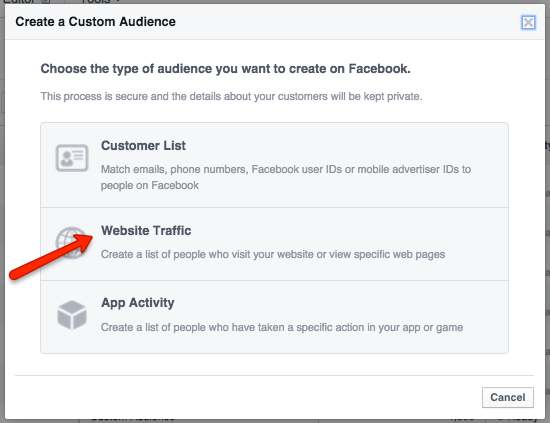
From here, you have a number of options.
You can target everyone who has visited any page of your website, people who have visited specific pages, people who’ve visited some pages but not others, and people who haven’t visited in a certain amount of time:
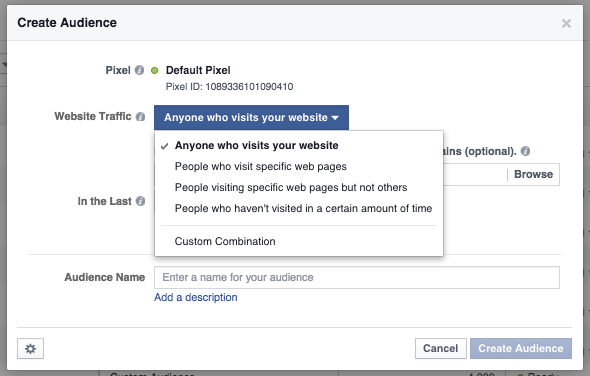
If you want to retarget people who didn’t opt into your last campaign, select the 3rd option.
Then type in your landing page and confirmation pages’ URLs:
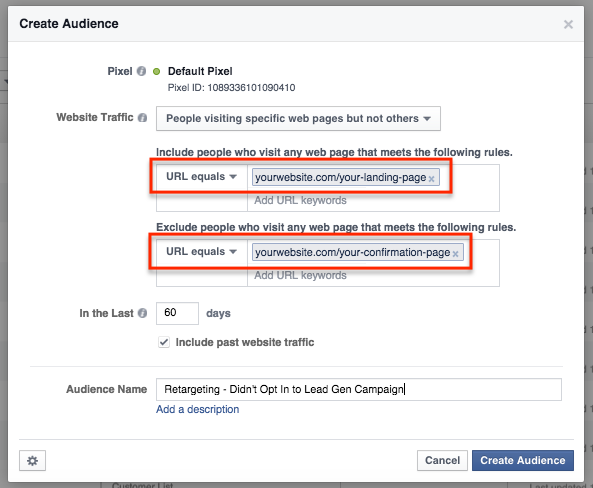
And click “Create Audience.”
Head back into the Power Editor and create a new campaign, ad set, and ad.
Go through and change the settings to your desire, but for your audience choose “Custom Audiences” and the retargeting audience you just created:
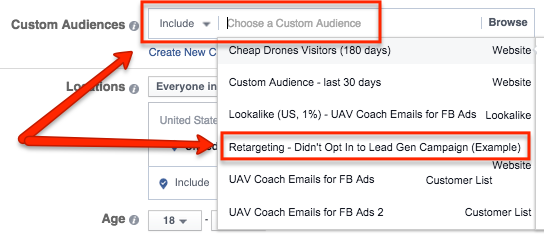
Then create your ads just like you did before, upload everything to Facebook, and let them rip!
Retargeting ads will often garner you higher ROI, as these people are already familiar with you and might need just a second or third nudge to convert.
3. LookaLike audiences
The final Facebook campaign I want to discuss is LookaLike audiences.
LookaLike audiences involve data that’s given to Facebook including people who are already associated with your business. This could be your email list, customer list, etc.
Facebook will then take that data and create a new audience that’s similar to that one based on their interests, purchasing behavior, and more.
LookaLike audiences can be effective for reaching new people who might have a desire for your products and services.
To create a LookaLike audience, gather email addresses from either your email list or customer list. Then click “Tools” → “Audiences” → “Create Audience” → “Custom Audience” again.
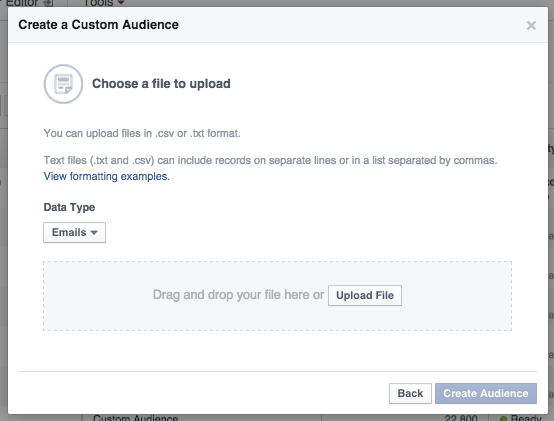
This time, choose “Customer List”:
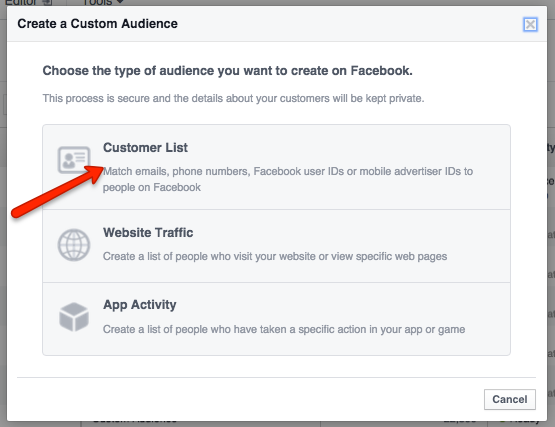
Then click “Upload a File.”
Upload your list and create the audience:
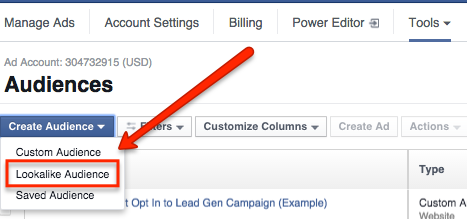
Go back to the Audiences page and choose “Create Audience” again, but his time choose “LookaLike Audience”:
Then select the list you uploaded, the country you want to market to, and I suggest going with 1% to get the closest match:
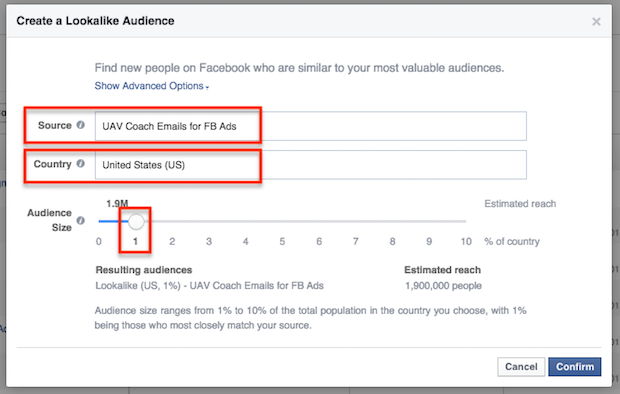
Then click “Confirm” and finish creating your LookaLike audience.
Go back to the Power Editor, create a new campaign with an ad set and ads, and edit your ad set’s audience again.
Choose “Custom Audience” and the LookaLike audience you just created.
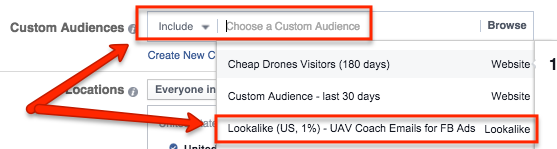
When you’re done editing the rest of your campaign, upload it to Facebook and let it fly.
Facebook advertising is an excellent marketing tool. I’ve used it to get ROIs of 200%+.
And once you’ve got a positive ROI, all you have to do is scale up your budget to increase your revenue.
It’s one of the most powerful marketing tools at your disposal.
Facebook advertising is one of the most powerful #marketing tools at your disposal
Click to tweet
8. Guest post on authoritative sites in your target market’s niche
In B2B content marketing, one of your top-of-the-funnel goals is to expose your target audience to your content and expertise.
Guest blogging can help you do this many ways:
- You can target sites that your audience reads regularly.
- You can include links back your website, either in the body content and/or author bio, to expose those people to your business.
- You can establish relationships with the top guns in your industry for ongoing gigs.
Here’s how to guest post effectively in your target market’s industry:
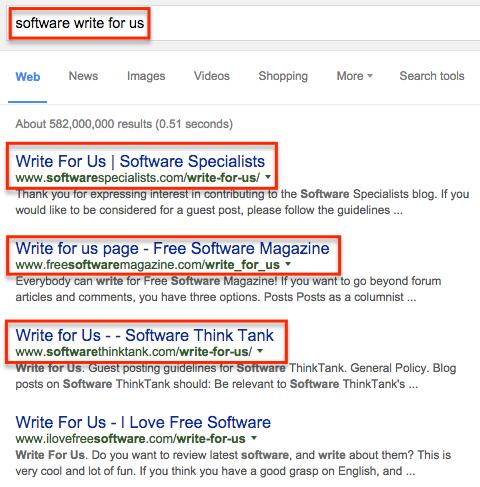
First, Google these search strings:
Your target niche + write for us
Your target niche + contribute
Your target niche + guest post
Your target niche + guest post by
Your target niche + guest article
This should bring up a list of guest post opportunities:
Click through to each one and find their content info.
Sometimes the site will have specific instructions for submitting guest posts. If not, send them an email like this:
Hi [FIRST NAME],
Just wanted to say how much I enjoy reading your content. I’ve been following [SITE NAME] for a while now, and I always get value out of your posts.
I noticed that you accept guest articles. I was wondering if I could write one for you?
I run [YOUR BUSINESS] and we do [WHAT YOU DO].
Here are a few pieces I’ve written that might be similar to what you’re looking for:
ARTICLE #1
ARTICLE #2
ARTICLE #3
And here are a few ideas your audience might like:
Idea #1
Idea #2
Idea #3
Of course, if you would like to discuss other topics I’m more than welcome.
Cheers!
[YOUR NAME]
Rinse and repeat this for any site you want to be published on.
If you’ve got a lot of options and want to vet these sites, check out their content and see how much engagement they get:
- Shares
- Comments
These metrics will tell you how much exposure you can expect your guest post to get.
9. Offer free content at trade shows
While trade shows aren’t traditional B2B content marketing channels, the in-person interaction can make it a smart channel to test out.
Trade shows are all about displaying your business’s expertise to as many people as possible as effectively as possible in the time allotted.
However, you won’t close every lead/customer immediately, so it can be helpful to have some way for prospects to get back in touch with you afterwards and remain on their minds.
This is where content comes into play.
Print out copies of your best content and include your contact information.
As prospects leave your booth, hand out these articles as a parting gift. Chances are, you made an impression on them but not a big enough one just yet.
Your content lets these people get a deeper look at your expertise after the trade show ends.
As they’re weighing their options afterwards, they’ll have something physical to connect them to your business.
10. Use content discovery platforms
Paid content discovery is a useful passive traffic generation option.
These ads appear on other related sites, usually below the content:

Most appear as inconspicuously as “related posts” sections usually do, so they don’t look like regular ads and almost all of them point to content rather than sales pages.
Content discovery can be a good way to feature your content on some of the top sites in your target market’s industry.
Here are two of the most popular options you can check out:
1. Outbrain

2. Taboola
To wrap it up
Remember that no matter which strategy you’re implementing, B2B content marketing is all about results.
Your content should help your audience get results, and your copy should be results-oriented.
Use these strategies to propel your content in front of your audience and attract them to your business, where you can close them as leads and nurture them into customers.